

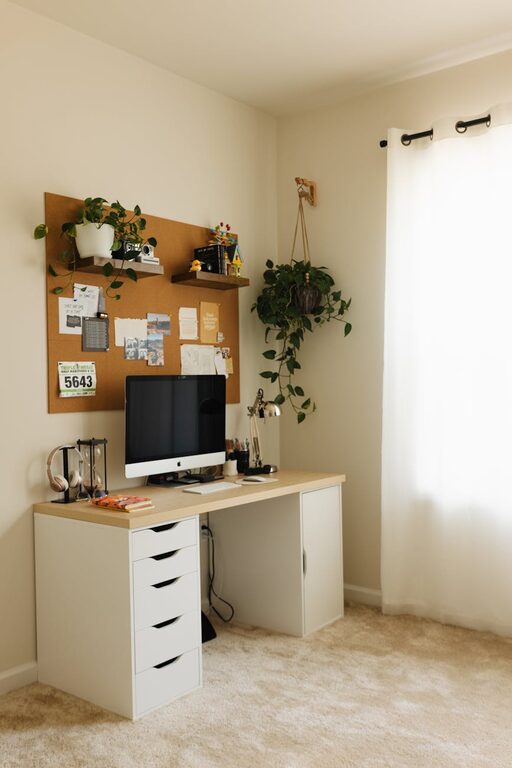
Creating a productive home workspace is essential for anyone working remotely or managing tasks from home. A well-organised and comfortable area can significantly improve focus, reduce distractions, and increase overall work satisfaction. Whether you have a dedicated room or a small corner, these tips will help you design an efficient and inviting environment tailored to your needs.
Choose the Right Location
Consider Natural Light and Noise Levels
The location of your workspace plays a critical role in productivity. Aim to select a spot with plenty of natural light as it can boost your mood and energy. Avoid areas with frequent noise or high foot traffic to minimise distractions.
Space and Privacy
If possible, opt for a separate room or space that can be dedicated solely to work. This helps create a mental boundary between professional and personal life. If space is limited, choose a quiet nook or corner that you can personalise and keep organised.
Invest in Comfortable, Ergonomic Furniture
Desk and Chair
Your desk and chair are the foundation of a comfortable workspace. Choose an adjustable chair with good lumbar support to maintain good posture and reduce back pain. A desk at the right height ensures your arms and wrists are comfortable while typing or writing.
Accessories for Comfort
Consider footrests, wrist supports, or even a standing desk converter if you prefer to alternate between sitting and standing. These accessories can prevent strain and support better longer-term health.
Organise Your Space Efficiently
Declutter Regularly
A cluttered desk can lead to a cluttered mind. Keep only essential items on your workspace and organise documents, stationery, and electronics in drawers or organisers. Regularly declutter to maintain a tidy area.
Use Storage Solutions
Invest in shelves, filing cabinets, or desk organisers to keep papers and supplies in order. Label boxes or folders so you can quickly find what you need without interrupting your workflow.
Set Up Technology for Efficiency
Reliable Internet and Devices
A strong and stable internet connection is key to avoiding disruptions. Use up-to-date devices like laptops, monitors, and keyboards that suit your work practices and enhance productivity.
Cable Management
Tidy cables improve both the appearance and safety of your desk. Use cable clips, ties, or a cable organiser box to keep cords neat and out of the way.
Personalise Your Workspace
Add Inspiring Elements
Incorporate a few personal touches like photos, plants, or art that inspire and motivate you. A plant, for example, not only beautifies your space but can also improve air quality.
Maintain a Calm Atmosphere
Use calm and neutral colours, appropriate lighting, and minimal distractions to create an atmosphere conducive to concentration. Avoid overwhelming patterns or cluttered decorations.
Establish a Routine and Boundaries
Set Working Hours
Define clear working hours and communicate these with family or housemates. This helps set expectations and allows you to switch off when the workday ends.
Use Breaks Wisely
Schedule regular breaks to stretch, rest your eyes, and refresh your mind. Even short pauses can increase productivity over long periods of work.
Improve Lighting and Reduce Eye Strain
Combine Natural and Artificial Light
Make the most of daylight, but also include a desk lamp with adjustable brightness to reduce eye strain, particularly during early mornings or late evenings.
Position Your Screen Correctly
Place your computer screen at eye level and about an arm’s length away to avoid neck strain and prevent screen glare.
—
By carefully planning your home workspace with these tips, you can create an environment that encourages productivity, supports your wellbeing, and helps you enjoy working from home. Remember, flexibility and regular adjustments are key as your needs and work habits evolve.